Class Diagram Online
Build UML class diagrams visually in your browser. Add classes with fields and methods, draw inheritance, composition, aggregation, and association links, or paste a SQL schema to scaffold a domain model in one click.
Classes (7)
| Kind | V | Name | Type | Params | |
|---|---|---|---|---|---|
| — | |||||
| — | |||||
| — | |||||
| Kind | V | Name | Type | Params | |
|---|---|---|---|---|---|
| — | |||||
| — |
| Kind | V | Name | Type | Params | |
|---|---|---|---|---|---|
| — | |||||
| Kind | V | Name | Type | Params | |
|---|---|---|---|---|---|
| — | |||||
| — | |||||
| — | |||||
| Kind | V | Name | Type | Params | |
|---|---|---|---|---|---|
| — | |||||
| — | |||||
| — |
| Kind | V | Name | Type | Params | |
|---|---|---|---|---|---|
| — | |||||
| — | |||||
| — |
| Kind | V | Name | Type | Params | |
|---|---|---|---|---|---|
| — | |||||
| — | |||||
| — |
Relations (6)
classDiagram
  class User {
    +int id
    +string email
    +string name
    +register(email, name) User
    +placeOrder(cart) Order
  }
  class Customer {
    +Address shippingAddress
    -PaymentMethod preferredPayment
  }
  class Admin {
    +string[] permissions
    +banUser(userId) void
  }
  class Order {
    +int id
    +datetime placedAt
    +float total
    +addItem(product, qty) void
  }
  class OrderItem {
    +Product product
    +int quantity
    +float unitPrice
  }
  class Product {
    +int id
    +string title
    +float price
  }
  class Address {
    +string street
    +string city
    +string country
  }
  User <|-- Customer
  User <|-- Admin
  Customer "1" --> "*" Order : places
  Order "1" --* "*" OrderItem
  OrderItem "*" --o "1" Product
Customer "1" --* "1" Address : ships toExample
Online class diagram example
A compact UML class diagram showing a diagram model connected to export methods.
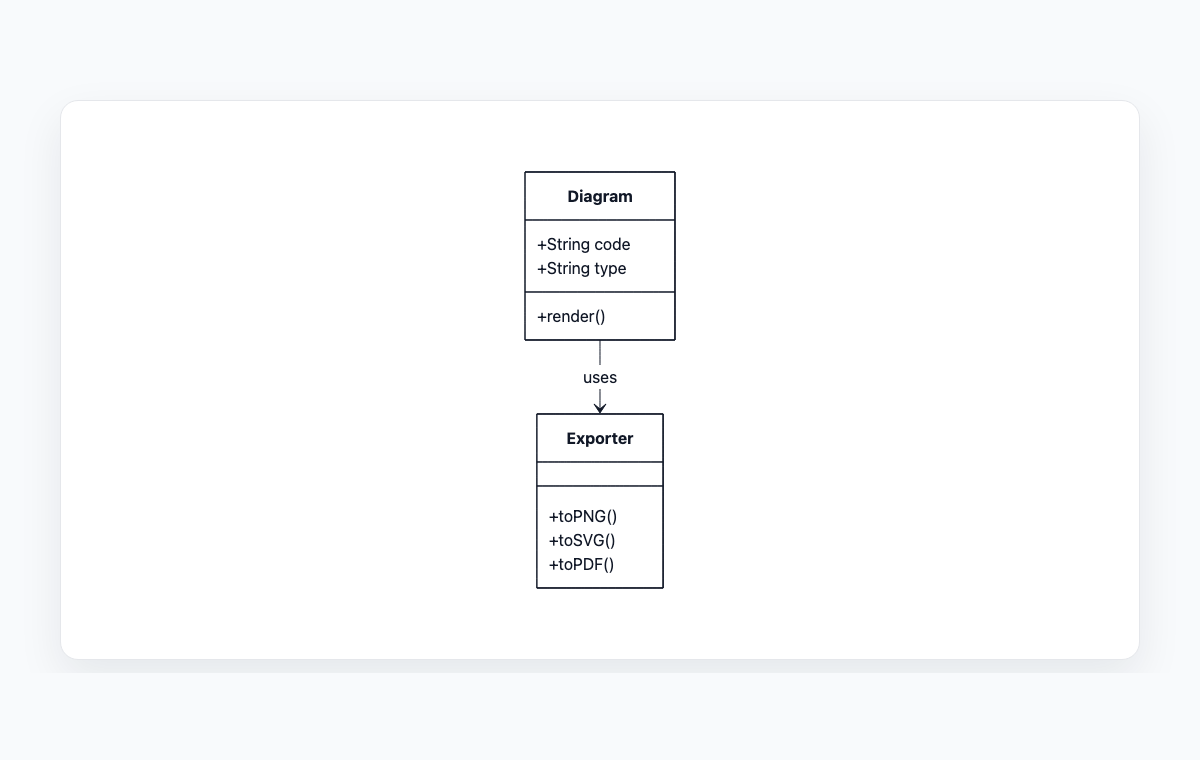
Mermaid code
classDiagram
    class Diagram {
      +String code
      +String type
      +render()
    }
    class Exporter {
      +toPNG()
      +toSVG()
      +toPDF()
    }
    Diagram --> Exporter : uses
How to build a class diagram online
Add a class for each domain object and load an example or DB schema to start fast.
Define fields and methods with visibility markers (+ public, - private, # protected, ~ package).
Draw relations between classes — pick from inheritance, composition, aggregation, association, dependency, or realization.
Copy the generated Mermaid classDiagram code or export the live preview as PNG or SVG.
Perguntas frequentes
What is a UML class diagram?
A class diagram describes the static structure of an object-oriented system: which classes exist, what fields and methods they expose, and how they relate via inheritance, composition, association, and other UML connectors. Mermaid's classDiagram syntax encodes the same model in plain text.
Which relation types are supported?
All eight standard Mermaid class-diagram relations are supported: inheritance, composition, aggregation, association, dependency, realization, plus solid and dashed links. Each relation has independent cardinality on both sides and an optional label.
Can I import an existing database schema?
Yes. Open the import panel and paste CREATE TABLE statements. The importer turns tables into classes, columns into fields, foreign keys into associations, and detected join tables into many-to-many relations. You can pick PascalCase or snake_case naming and toggle pluralization.
How is this different from the SQL to ERD tool?
The ERD tool produces a database-centric entity-relationship diagram, with explicit PK/FK markers and ER-style cardinality. This tool produces an object-oriented UML class diagram, better suited for documenting domain models, ORM mappings, or design discussions. Both can start from the same SQL DDL.
Is anything uploaded to a server?
No. Parsing and rendering happen entirely in your browser. Your schema and your model never leave your device.