Mermaid 轉 JPG 轉換器
將 Mermaid 圖表轉換為 JPG/JPEG 圖像。這是透過電子郵件、即時通訊和社群媒體分享時相容性最廣的圖像格式。
Mermaid 轉 JPG 轉換器
撰寫 Mermaid 程式碼,然後使用匯出按鈕下載 JPG
100%
Example
Mermaid to JPG example
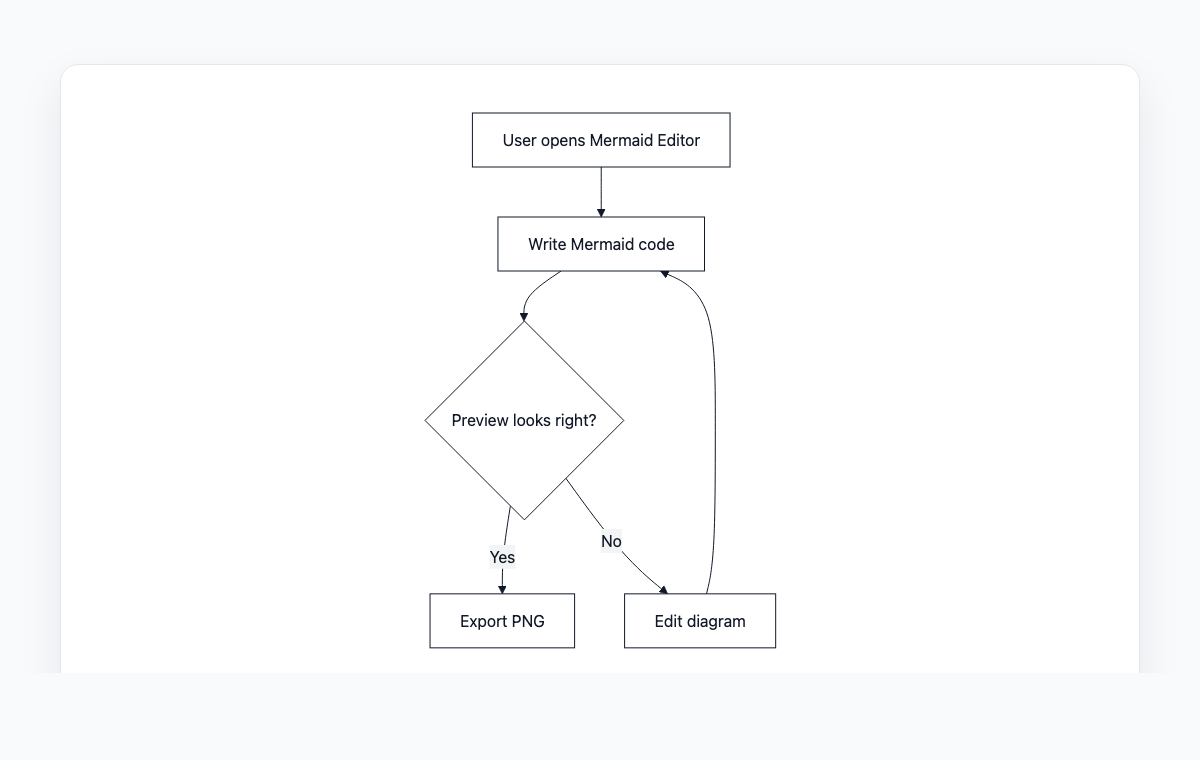
A simple Mermaid flowchart showing how code becomes a live preview and exportable PNG.
Mermaid code
graph TD
    A[User opens Mermaid Editor] --> B[Write Mermaid code]
    B --> C{Preview looks right?}
    C -- Yes --> D[Export PNG]
    C -- No --> E[Edit diagram]
    E --> B
如何將 Mermaid 轉換為 JPG
1
在編輯器中撰寫或貼上 Mermaid 圖表程式碼
2
即時預覽渲染後的圖表
3
點擊匯出按鈕並選擇 JPG 格式
4
JPG 圖像將自動下載
常見問題
什麼時候應該使用 JPG 而不是 PNG?
當檔案大小很重要時,JPG 最適合透過電子郵件和即時通訊分享。PNG 在需要透明背景或像素級精確品質時更好。對於包含文字的圖表,PNG 通常看起來更清晰。
匯出的 JPG 品質如何?
圖像預設以 95% 品質匯出,在視覺保真度和檔案大小之間提供了良好的平衡。
JPG 支援透明背景嗎?
不支援,JPG 不支援透明度。背景將為白色。如果需要透明背景,請使用 PNG 或 WebP 格式。