Sequence Diagram Online
Build sequence diagrams visually in your browser. Add actors, messages, notes, and nested blocks (alt, opt, loop, par), then copy clean Mermaid sequenceDiagram code or import directly from logs.
Actors and participants (4)
Steps (11)
sequenceDiagram
  autonumber
  title Login flow
  actor User
  participant Web as Web App
  participant Auth
  participant DB
  User->>Web: POST /login {email, password}
  Web->>Auth: verifyCredentials()
  Auth->>DB: SELECT user WHERE email=?
  DB-->>Auth: user row
  alt password matches
    Auth-->>Web: token
    Web-->>User: 200 OK + Set-Cookie
  else wrong password
    Auth-->>Web: invalid
    Web-->>User: 401 Unauthorized
endExample
Online sequence diagram example
A Mermaid sequence diagram for documenting browser, editor, and renderer interactions.
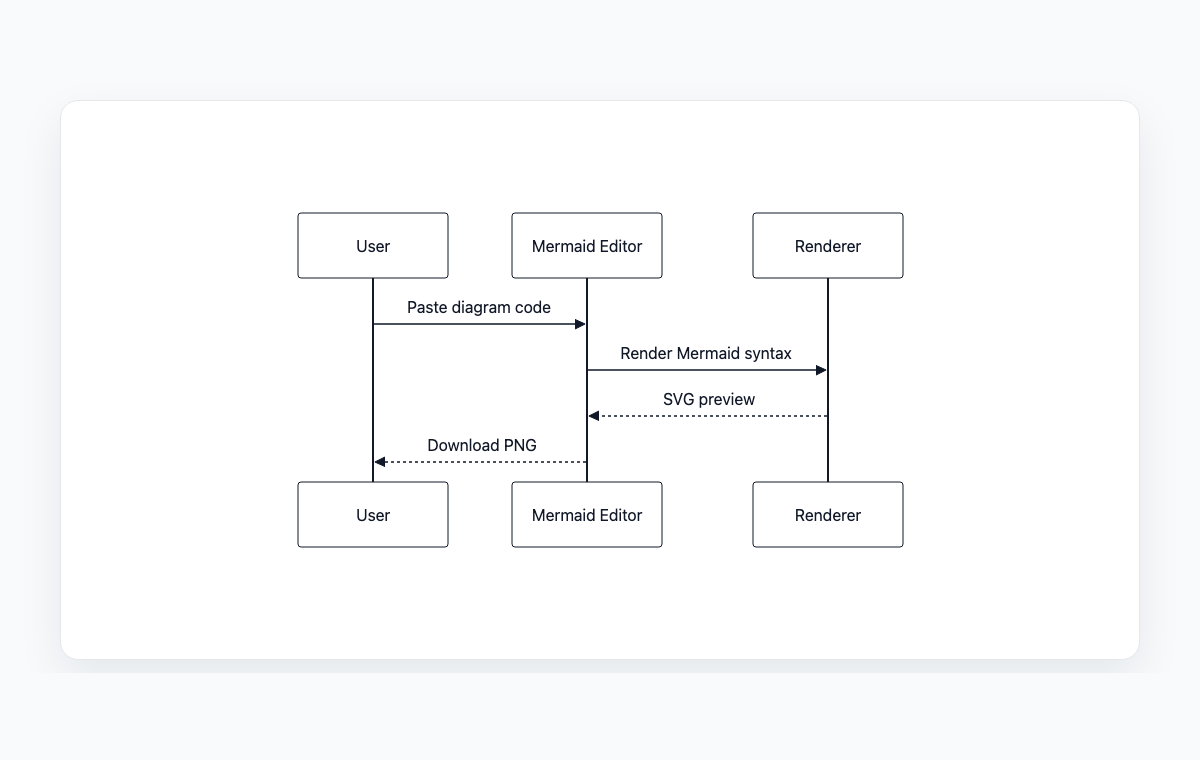
Mermaid code
sequenceDiagram
    participant User
    participant WebApp as Mermaid Editor
    participant Renderer
    User->>WebApp: Paste diagram code
    WebApp->>Renderer: Render Mermaid syntax
    Renderer-->>WebApp: SVG preview
    WebApp-->>User: Download PNG
How to build a sequence diagram online
Add an actor or participant for each system, service, or person involved in the flow.
Add messages between actors and pick the arrow type (sync, async, reply, lost).
Wrap branches in alt, opt, loop, or par blocks; add notes to annotate the flow.
Copy the generated Mermaid code or export the live preview to PNG or SVG.
Frequently Asked Questions
What is a sequence diagram?
A sequence diagram shows how actors and systems exchange messages over time. Vertical lines represent participants and arrows between them represent ordered messages, including requests, responses, and asynchronous events.
Which arrow types are supported?
All standard Mermaid arrows are supported: solid sync, dashed reply, open async, lost message, and plain solid or dotted lines without an arrowhead. You can mix them freely in the same diagram.
Can I import existing logs?
Yes. Open the import panel and paste raw logs, request traces, or transcripts. The parser recognizes arrow notation, key-value pairs, service or destination fields, and HTTP method paths, then turns each match into a message.
Is anything uploaded to a server?
No. The whole tool runs in your browser, including the log parser. Your data never leaves your device.