Packet Diagrams
Visualize network protocol packet structures with bit-level field layouts. Essential for network protocol documentation.
What is Packet Diagrams?
Packet diagrams visualize the structure of network protocol data units by showing individual fields, their bit positions, and sizes. They are essential tools in network engineering, protocol design, and cybersecurity education. Packet diagrams make it easy to understand how data is organized at the binary level, showing headers, payloads, and field boundaries clearly.
Edit and preview
Build a Packet Diagrams with Mermaid syntax and see changes instantly.
Example
Packet diagram example
A Mermaid packet diagram documenting fields used by a generated diagram export.
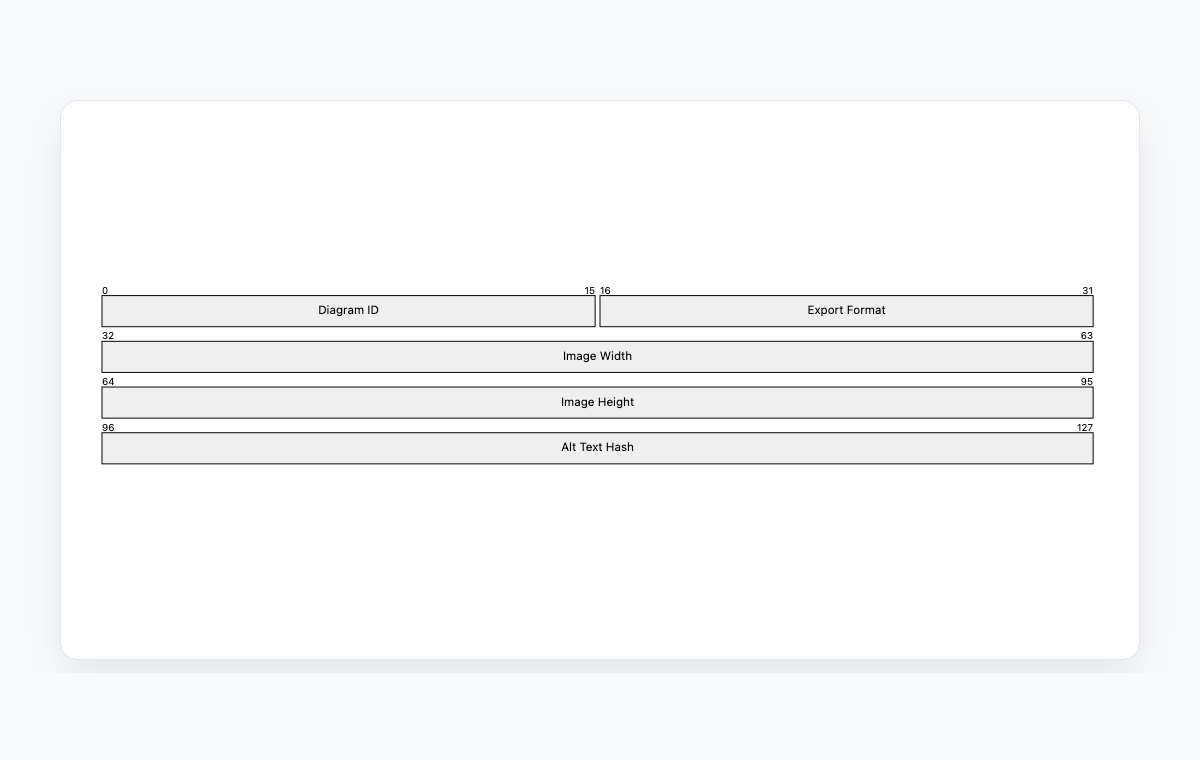
Mermaid code
packet-beta
  0-15: "Diagram ID"
  16-31: "Export Format"
  32-63: "Image Width"
  64-95: "Image Height"
  96-127: "Alt Text Hash"
Common Use Cases
Protocol Documentation
Document TCP, UDP, IP, and custom protocol headers. Show field positions, sizes, and purposes for protocol implementation reference.
Network Education
Teach network fundamentals with clear visual representations of packet structures. Help students understand protocol layers.
Security Analysis
Visualize packet structures during security audits. Understand header fields for firewall rules, IDS signatures, and packet filtering.
Custom Protocol Design
Design new protocol formats with precise bit-level field definitions. Communicate packet structures to implementation teams.
Key Features
Bit-Level Precision
Define fields with exact bit ranges to show precise positions and sizes within the packet structure.
Field Labels
Add descriptive labels to each field for clear identification of protocol components.
Row-Based Layout
Fields are arranged in rows, typically 32 bits wide, matching standard protocol documentation formats.
Simple Syntax
Define packet structures with intuitive range-label pairs that are easy to write and maintain.
Best Practices
Follow Standard Widths
Use 32-bit row widths for standard protocol diagrams. This matches RFC documentation conventions.
Label All Fields
Every field should have a clear, descriptive label. Use standard names from protocol specifications.
Show Bit Numbers
Include bit position numbers to make field boundaries unambiguous and aid in implementation.
Focus on One Layer
Document one protocol layer per diagram. Create separate diagrams for Ethernet, IP, TCP, and application layers.
Explore other diagram types
Flowcharts
Visualize processes, workflows, and algorithms with nodes and directional arrows. Perfect for business processes and decision trees.
Sequence Diagrams
Document interactions between different actors or systems over time. Ideal for API documentation and system design.
Class Diagrams
Model object-oriented systems with classes, attributes, and relationships. Essential for software architecture planning.
State Diagrams
Represent state transitions in systems or applications. Great for modeling lifecycle states and workflows.
Gantt Charts
Plan and track project timelines with tasks and dependencies. Perfect for project management and scheduling.
ER Diagrams
Design database schemas with entities and relationships. Ideal for database modeling and documentation.
User Journey
Map user experiences and interactions across touchpoints. Excellent for UX design and customer journey mapping.
Git Graphs
Visualize Git branching strategies and commit histories. Helpful for explaining version control workflows.
Mindmaps
Organize ideas, brainstorm concepts, and create hierarchical visual structures. Perfect for planning and knowledge mapping.
Pie Charts
Display proportional data distributions with circular charts. Ideal for showing percentages and market share breakdowns.
Timelines
Visualize chronological events and milestones along a time axis. Great for project histories and roadmaps.
Kanban Boards
Organize tasks into columns representing workflow stages. Perfect for agile project management and task tracking.
Quadrant Charts
Plot items on a two-axis grid to compare and prioritize. Ideal for feature prioritization and strategic analysis.
Sankey Diagrams
Visualize flow quantities between nodes with proportional arrows. Perfect for energy flows, budget allocation, and conversion funnels.
XY Charts
Create bar charts and line charts with customizable axes. Ideal for data visualization and trend analysis.
Block Diagrams
Build structured layouts with blocks arranged in columns and rows. Great for system architecture and component overviews.
Architecture Diagrams
Design cloud and system architecture with service icons and connections. Perfect for infrastructure documentation.